

textAnyone working with mobile traffic in affiliate marketing eventually runs into the same core issue: ad campaigns don’t go live because creatives get rejected. Moloco, as a modern DSP platform, offers fast and precise tools for buying traffic powered by machine learning — but ad moderation is still the gatekeeper that decides whether your campaign launches or not.
Understanding how Moloco moderation works is important for two reasons. First, it saves time and budget — you don’t have to fix and resubmit rejected ads over and over again. Second, it allows you to build stable, predictable campaigns.
In this article, we’ll break down how creative review works in Moloco, the most common rejection reasons, and how to prepare creatives so they pass moderation on the first attempt.
How moderation works in Moloco
Moloco DSP uses a two-level moderation system. It combines automated checks with limited manual review, both powered by data analysis and machine learning.
Automated moderation
This is the primary layer. It’s based on machine learning models and large-scale data analysis. Algorithms scan ad creatives and copy for prohibited content, including:
- Use of brand names without authorization;
- Hidden or misleading elements;
- Aggressive or inappropriate themes;
- Technical requirements: sizes, formats, CTA compliance.
This review happens quickly, and most unsuitable ads are filtered out at this stage.
Manual moderation
Manual review is applied only in edge cases. If the automated system flags questionable elements, the creative may be sent to a human reviewer. They check compliance with campaign policies, assess the creative approach, and make the final decision. In practice, this happens rarely — automated moderation covers the vast majority of cases.
Most common reasons creatives get rejected
Moloco reviews creatives to protect users and advertisers while maintaining a high standard of quality control in mobile monetization. Violating platform policies leads to rejection. The most frequent reasons include:
- Adult content
Nudity, sexual acts, harassment, prostitution, explicit poses — even mild cleavage or implied sexual context can trigger rejection. - Violence and shock content
Injuries, dismemberment, violence against children or vulnerable groups, or shocking visuals. - Deception and fraud
Fake interfaces, false promises, counterfeit products, or misleading creative elements. - Drugs, weapons, smoking, contraception
Promotion or depiction of illegal substances, weapons, or restricted products. - Hate speech and sensitive content
Discrimination, offensive messaging, or shocking social themes. - Personal data violations
Claims of access to user data, or disclosure of personal information without consent. - Famous personalities
Using images of celebrities or politicians without permission. - Fake news
Creatives disguised as news or media content: clickbait headlines, invented facts, or attempts to mimic legitimate media outlets.
Even minor violations can result in rejection. Always check creatives for policy compliance before launch — it saves both time and budget.
In addition, individual ad exchanges may reject creatives based on their own internal rules. To better understand rejection reasons, refer to Moloco’s official troubleshooting guide for rejected creatives.
Creative example: before and after
To understand how Moloco evaluates creatives, it helps to look at a real example from the iGaming vertical.

In the original creative, two women are shown wearing tight clothing. One is turned sideways, emphasizing her body, while the other looks directly at the camera. This visual immediately falls into the adult-risk zone: suggestive poses, focus on the body, and implied sexualization. Moloco is extremely sensitive to such signals. The creative looks risky, distracts from the actual offer, and violates content requirements — rejection is almost guaranteed.
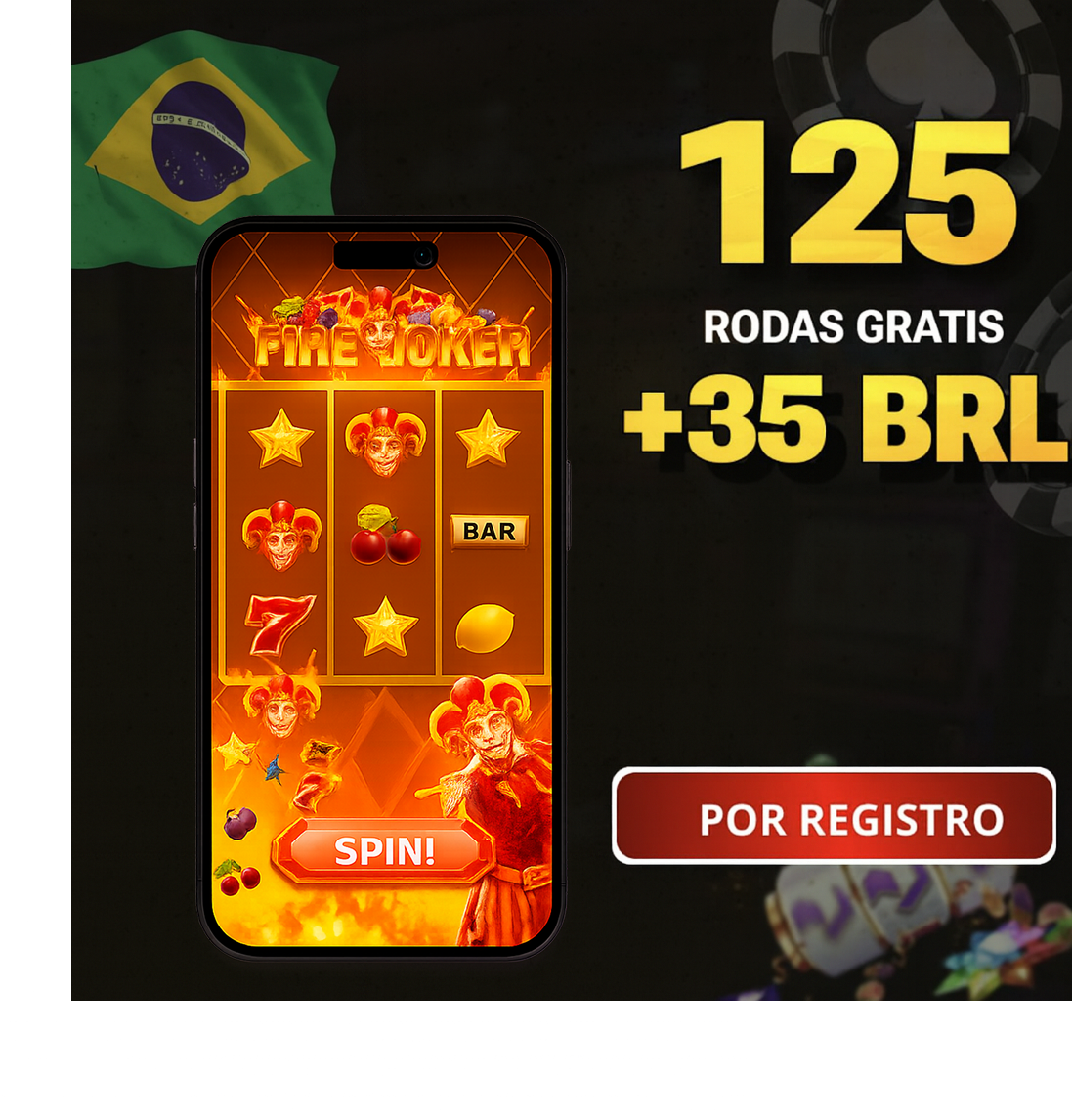
In the revised version, the women are removed entirely. Instead, the creative features a smartphone displaying the Fire Joker game. Promotional text and CTA remain unchanged, but the focus shifts fully to the product itself. The visual becomes cleaner, safer, and more transparent. In this form, the creative meets Moloco’s requirements and passes moderation without issues.
What to do if Moloco rejects your creative
Sometimes Moloco rejects creatives not because of real violations, but because the algorithm misinterprets the visual. This happens fairly often, especially in gambling-related campaigns.
In practice, the simplest first step is to re-upload the creative. Moloco’s algorithm isn’t always consistent: the same ad may be rejected once and approved after a re-upload. Before contacting support, always try resubmitting.
If the creative gets rejected again and you’re confident there are no violations, the fastest solution is to contact us directly. We’ll identify the reason and help resolve the issue without unnecessary back-and-forth.
Tips to pass moderation on the first try
Moloco moderation is more straightforward than it may seem. It’s generally quite loyal, and if you stay away from restricted topics, creatives pass without issues. The core principle is simple: use clean, straightforward visuals and don’t try to “outsmart” the algorithm.
Avoid anything that triggers moderation — adult hints, recognizable public figures, politicians, or fake news formats. Moloco blocks these instantly, regardless of GEO or ad format.
Conclusion
Creatives in Moloco are rejected for clear, repeatable reasons. Most rejections come down to adult content, celebrities, fake news, or similar violations. Once you understand how automated moderation works and what triggers it, you can predict rejections already at the production stage. The result is fewer re-uploads, faster launches, and more stable traffic delivery.
If you want to run Moloco campaigns without unnecessary hassle and focus purely on testing and creatives, use RentAcc agency accounts. Everything is already optimized for Moloco: dedicated support, instant issue notifications, automatic campaign stops if an app gets banned, auto-rules for balance top-ups and campaign pausing, and a full spend history — all designed to keep your campaigns running smoothly.
 Share this post