
Moloco positions itself as a powerful performance platform with advanced AI optimization and access to widescale in-app inventory. However, despite all its advantages, some affiliates face an issue where campaigns get stuck in the Submitted (Preparing) status.
Unlike Facebook or Google, where algorithms can quickly pick up even small volumes, Moloco requires a more substantial data feed. To find a working bundle and achieve strong results, you typically need to allocate $1,500–3,000 per GEO for testing. For many affiliate teams, this is a noticeable entry threshold — which raises a logical question: is the risk justified?
In this RentAcc article, we’ll explain when Moloco becomes the best choice, why campaigns remain in Submitted status, how to resolve it, and how to work with creatives to find a converting setup.
Prospects of Launching Campaigns in Moloco
Moloco DSP operates exclusively with in-app traffic. Its advanced AI algorithms can independently optimize campaigns toward your selected metric — installs, in-app events, ROAS, or retention.
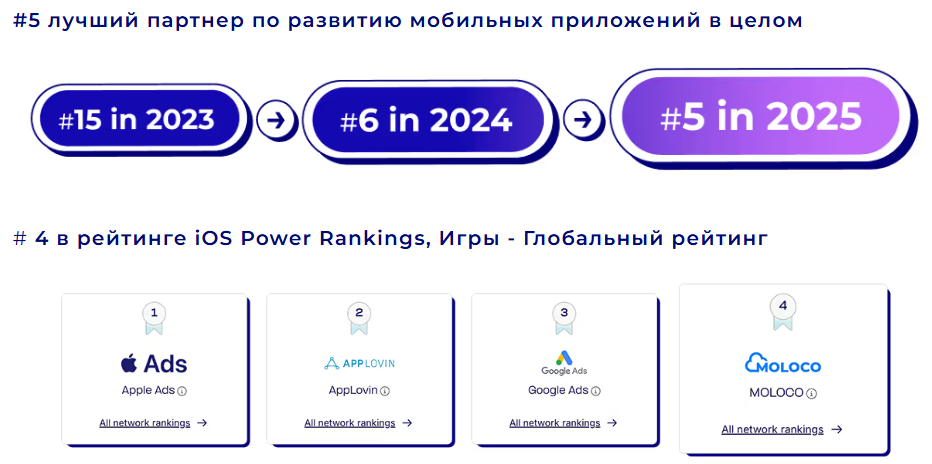
Moloco’s reach exceeds 6.7 billion devices, and its advertising network includes over 3 million apps, creating strong scaling potential. In 2025, the company ranked 4th in the iOS Power Global ranking and entered the top 5 as a leading app growth partner.
Moloco is integrated with major mobile ad networks such as Unity Ads, IronSource, AppLovin, and others. In practice, this means that through a single account you gain access to ad placements across all these platforms within one unified interface — without signing separate contracts or managing dozens of dashboards.
Additionally, this traffic source provides:
- Result-oriented optimization.
If you set optimization toward purchases or another target action, the algorithm will aim to attract users most likely to complete it. This allows you to reduce CPI while increasing the share of paying users, directly improving ROI. - Simple scaling.
The platform does not limit traffic volumes and allows gradual increases in daily budgets. Thanks to its broad partner network, scaling spend does not overheat the auction as quickly as in narrower traffic sources. - Higher LTV.
With properly configured tracking, the system will focus on audiences likely not only to install the app but also to continue using it and generating revenue. - A more flexible approach to complex verticals.
For teams working with grey niches, Moloco can serve as a viable alternative to mainstream platforms. As long as creative requirements are met and clearly prohibited content is avoided, campaigns generally pass moderation consistently.
You can connect an agency Moloco account through the RentAcc advertising platform. The service not only provides access to agency dashboards but also helps manage campaigns — automatically stopping ads if an app is removed from the store or replenishing the balance when it reaches a critical threshold.
Working with Creatives and Passing Moderation
Moloco is considered a relatively loyal platform in terms of moderation, but it still has clear requirements regarding creative formats and quality.
Based on media buying experience, the following creative types deliver the strongest results in in-app advertising:
- Playable Ads — interactive creatives that allow users to test the gameplay directly within the ad. A person starts playing, gets engaged in the process, and is more likely to install the app to continue.
- Vertical videos — ideal for product demonstrations, storytelling, and rapid testing. These creatives scale easily and allow you to adapt approaches for different audience segments.
For maximum reach, it’s important to prepare creatives in all recommended sizes. This ensures proper display across user devices and reduces impression limitations. All guidelines on available image and video formats can be found in the official practical guide of Moloco.
What to Do If Your Campaign Status Is “Submitted”
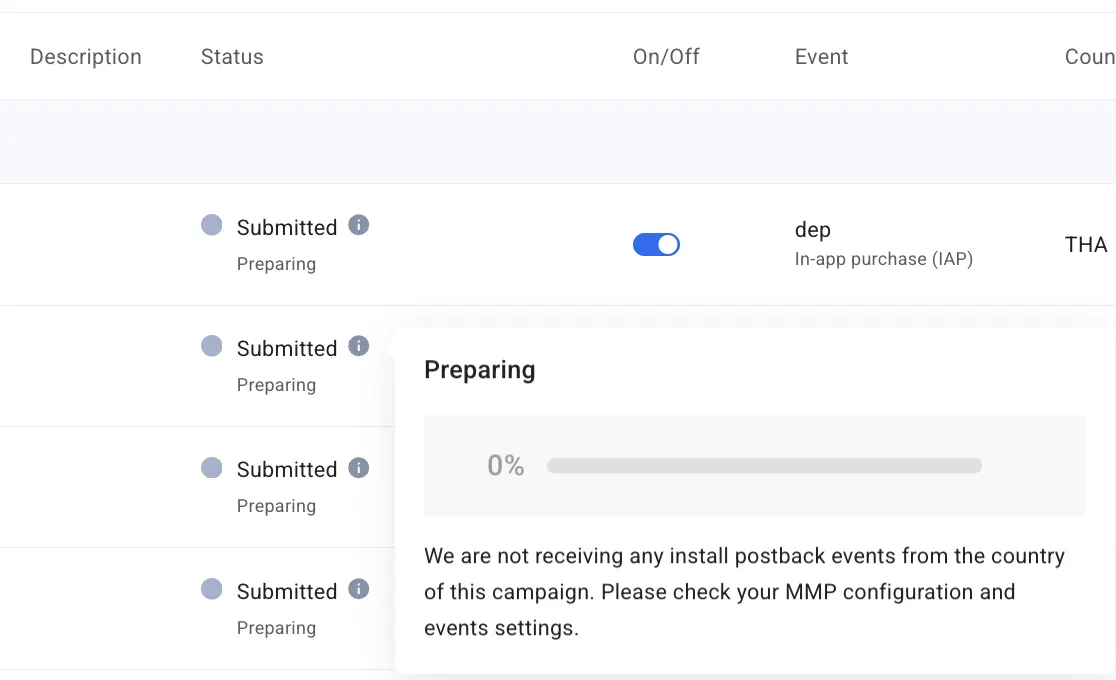
Even if all formal requirements are met, you may still see the Moloco Submitted status. This means the campaign has been created and sent for processing but has not yet been activated.
At this stage, Moloco:
- verifies campaign settings;
- waits for MMP integration confirmation;
- waits to receive install postbacks.
The third point is most often the reason for launch delays. In most cases, there are two common causes:
1. Incorrect Integration Setup, Moloco is not receiving events due to misconfigured integration.
To resolve this, carefully review the official postback setup instructions via AppsFlyer and ensure everything is configured correctly. Alternatively, you can contact RentAcc managers to receive a ready-to-use manual.
2. No Events (or Insufficient Data) in the MMP or there are not enough of them to confirm the integration.
Let’s break this down further: you’ve added a new app, but it does not yet have attributed events. Without enough install or in-app event data, Moloco cannot confirm the integration, and the campaign remains in Submitted status.
Solution for “Events Are Not Being Passed”
After adding and approving your app, the next step is to check the Postback Dashboard in Moloco.
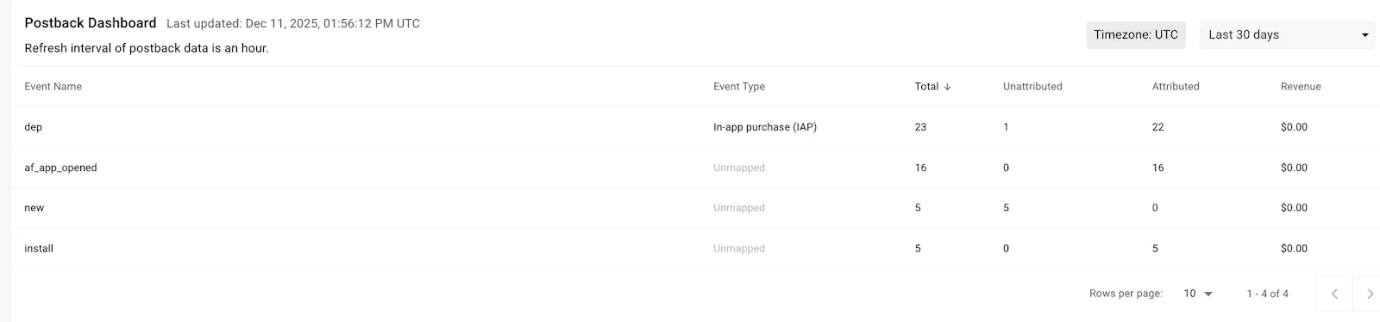
For a new app, this section is usually empty — the system does not see install postbacks or in-app events. Without this data, event-based optimization will not start.
There are two possible solutions:
- Option 1 — Launch with Install Optimization
Start a campaign optimized for installs. You will begin receiving attributed installs, registrations, and deposits. Once events appear in the Postback Dashboard, you can create a new campaign optimized for the desired in-app event. - Option 2 — Send Events Manually via the App Developer
This involves sending test events through the S2S API to your MMP. Essentially, it is a standard HTTP request that simulates an install or another event. The MMP accepts the event and forwards it to Moloco.
It is recommended to send a full set of key events — installs, registrations, and deposits — with a total volume of at least 1,000 events so the system can detect a stable data flow. After transferring the events, campaign activation may take up to 24 hours. This is a normal timeframe for integration confirmation.
When optimizing for in-app events, Moloco requires a properly configured MMP integration via AppsFlyer, Adjust, or Kochava.
If postbacks are not being received, you may see the following message in the interface:
“We are not receiving any install postback events from the country of this campaign. Please check your MMP configuration and events settings.”
This means:
- The MMP has not yet sent a single install postback to Moloco;
- The integration between the MMP and Moloco has not been confirmed;
- The system cannot activate the campaign without incoming data.
According to the official integration guidelines, Moloco must receive install postbacks for optimization to function. Event-based optimization becomes available only after the first install event is received. Without correct data transmission via the MMP, the campaign simply cannot start — even if all other settings are configured properly.
To ensure accurate performance tracking, you must integrate postbacks with your MMP platform. Once data starts flowing correctly, the Preparing status will change to Active.
Moloco Specifics: What to Consider Before Launch
There are no critical structural differences compared to other traffic sources, but it is important to understand the specifics of working with in-app traffic to maintain stable ROI in Moloco.
The ad network is primarily designed for affiliates experienced in working with MMPs, postbacks, and event-based optimization. Larger teams using their own apps typically have a dedicated specialist responsible for integration setup, while app rental services often provide apps fully prepared for launch. The workflow logic revolves around testing offers, creatives, and applications, so understanding the launch process is not particularly difficult.
You can also contact RentAcc managers to receive helpful guides. The platform’s specialists are ready to share practical insights, configuration tips, and best practices to help you launch campaigns and get your first installs faster.
For grey verticals, Moloco remains one of the more viable options. When promoting gambling apps, the platform allows optimization not only for installs but also for registrations, deposits, and other key events. This enables the algorithm to focus on users with higher LTV rather than attracting cheap but non-monetizing traffic.
Connect an agency Moloco account through the RentAcc advertising platform to access extended capabilities and automate launches using a convenient auto-rules system. Monitor KPIs and balances, automatically stop campaigns with weak metrics, or receive bot notifications — maintaining stable spend with minimal manual effort.
 Share this post