

Unity Ads can be considered a primary source for buying traffic in the iGaming vertical. But before launching, it is important to understand the specifics of the platform: how the auction works, what optimization options are available and what is required to get started.
Launching on Unity Ads can come with a number of challenges, primarily related to preparing creatives that will pass moderation and comply with the platform's requirements, as well as setting up the MMP. That is why the RentAcc platform team has prepared this overview to help you successfully launch and run a gambling product.
Unity Ads for iGaming Traffic
The Unity Ads advertising platform has proven to be a good fit for iGaming, primarily due to its relevant audience. The user is already inside a gaming app, so they tend to respond well to interactive formats, especially video and gamified playable creatives. With the right setup, such creatives can provide higher-quality signals for further optimization.
In addition, the platform offers several campaign objectives that allow advertisers to target specific categories of users. The main buying model is CPI, but deeper optimization options are also available, including CPE and ROAS. In the iGaming vertical, it is important to look beyond the installation itself and consider subsequent deposits.
With CPI optimization, the algorithm focuses on the probability of an install. However, when working with the gambling vertical, the user's journey from installation to deposit is much more important, and an even better indicator is high LTV. In this case, it is better to choose ROAS, where the further value of the acquired user is taken into account. For example, one player generates $200, while another generates $1,000. Naturally, the second user is more valuable, so the algorithm receives a signal to look for an audience with a similar likelihood of generating higher revenue.
For this type of optimization, a proper MMP integration is critical. Unity needs to receive data on target events and post-install revenue — the system uses this data to evaluate user quality and adjust media buying. When setting up a campaign, an optimization window is also selected:
- D7 allows you to evaluate results over a one-week period, meaning you can get data for campaign decisions faster.
- D28 takes the user's behavior over essentially a month of interaction with the app into account and keeps the main focus on high LTV rather than quick results after installation.
We recently covered the difference between these approaches in another article.
What Is Required to Launch?
To launch an advertising campaign in Unity Ads, you will need an app, an advertising account, creatives, properly configured analytics and the necessary event data being passed to the platform.
The optimal option is to work through a RentAcc agency account. Getting an account through an agency makes the launch process easier, access is provided almost immediately, and an expert team with real hands-on experience working with Unity Ads can help with the technical setup and advise on how to prepare creatives before launch.
Once the account is obtained, you need to add the app you plan to run traffic to and set up conversion tracking through the MMP. It is important to define the events that will be used for optimization in advance and make sure the data is being correctly passed to Unity Ads.
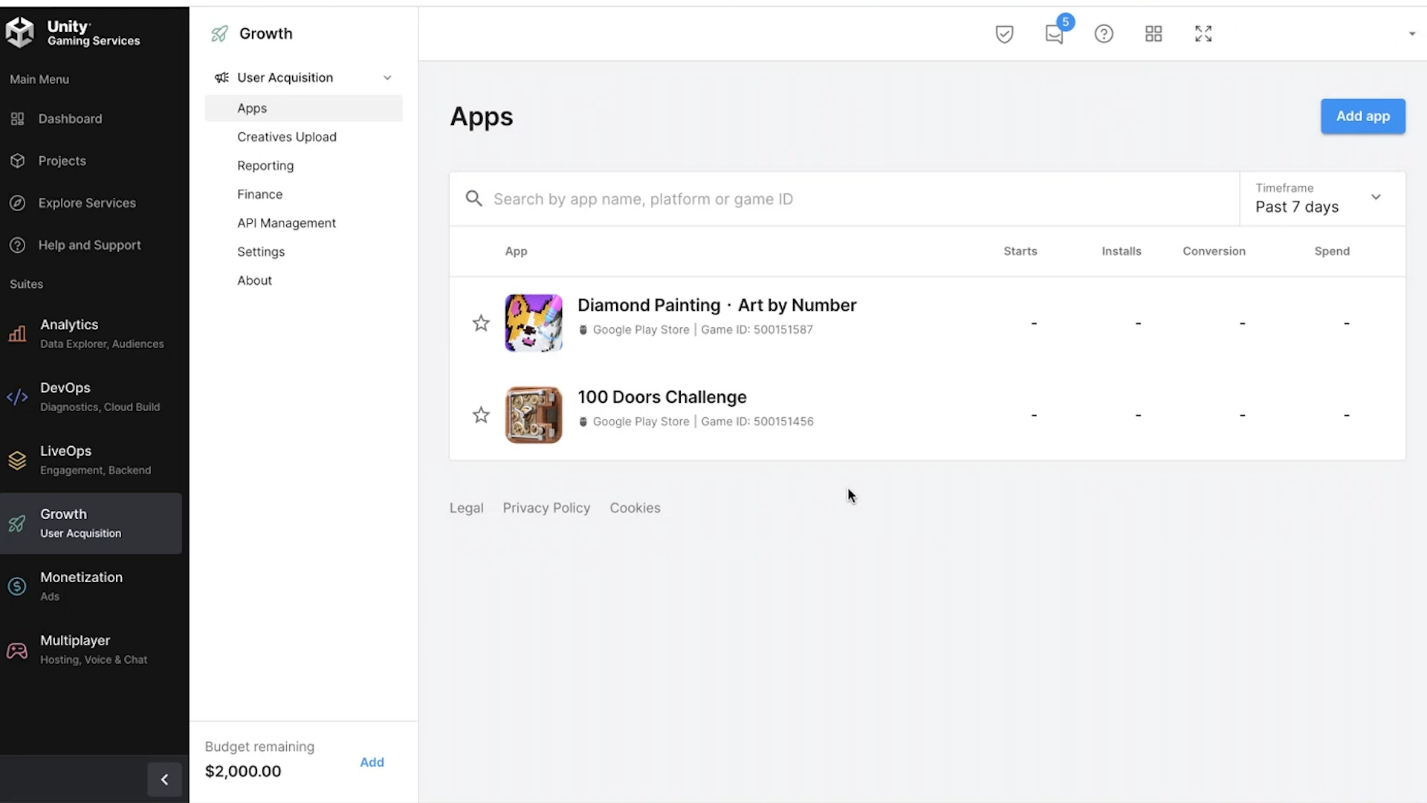
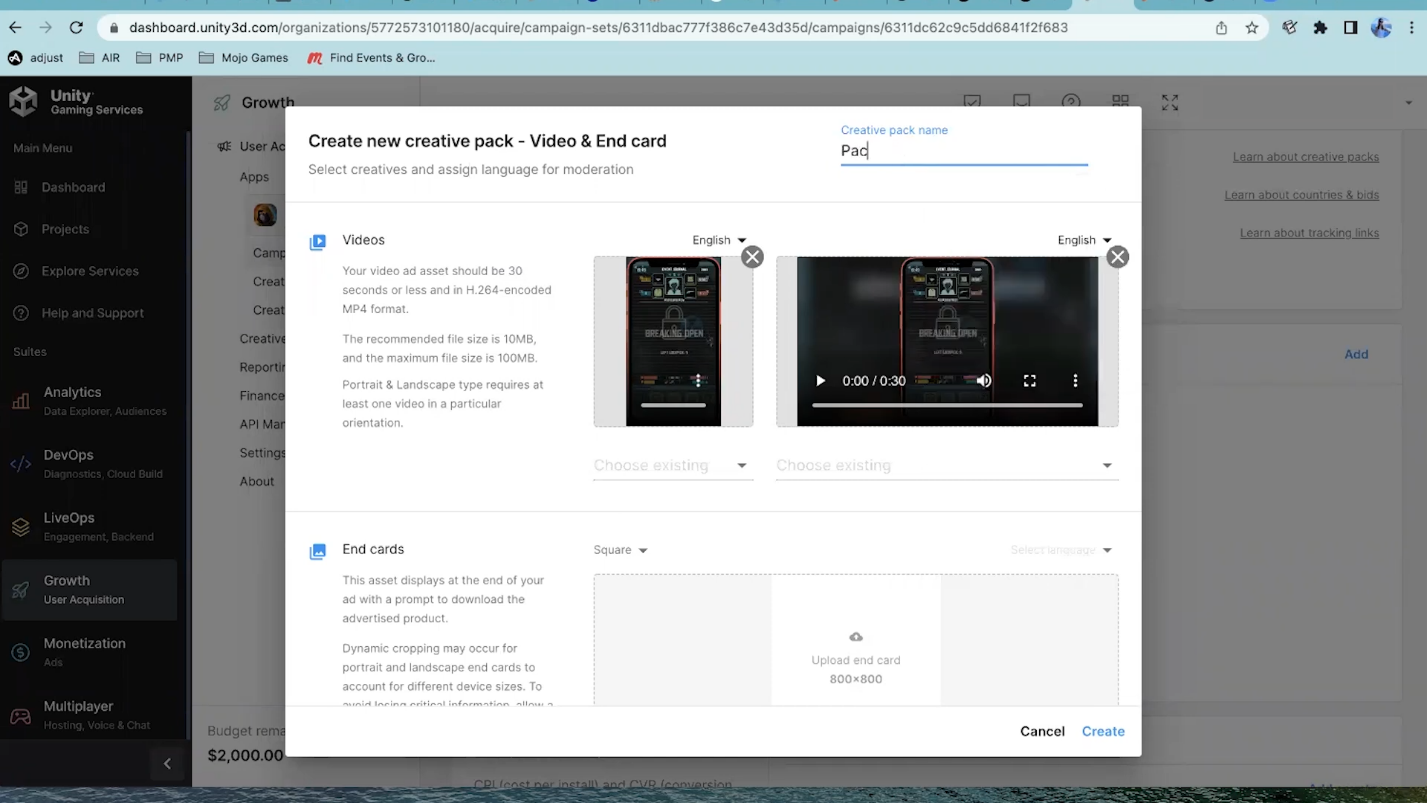
The next step is preparing the creatives. They are uploaded through Creative Packs, and you need to specify the language, which is taken into account during moderation. Once the review is complete, approved creatives can be used in the advertising campaign.
When creating a campaign, you select the objective, configure targeting, and add approved creatives. You can search for the right audience:
- by country and region;
- by device type;
- by categories and individual placements, for which bids can be set.
You can also use ready-made white and blacklists to filter out inefficient inventory and work on improving ROI.
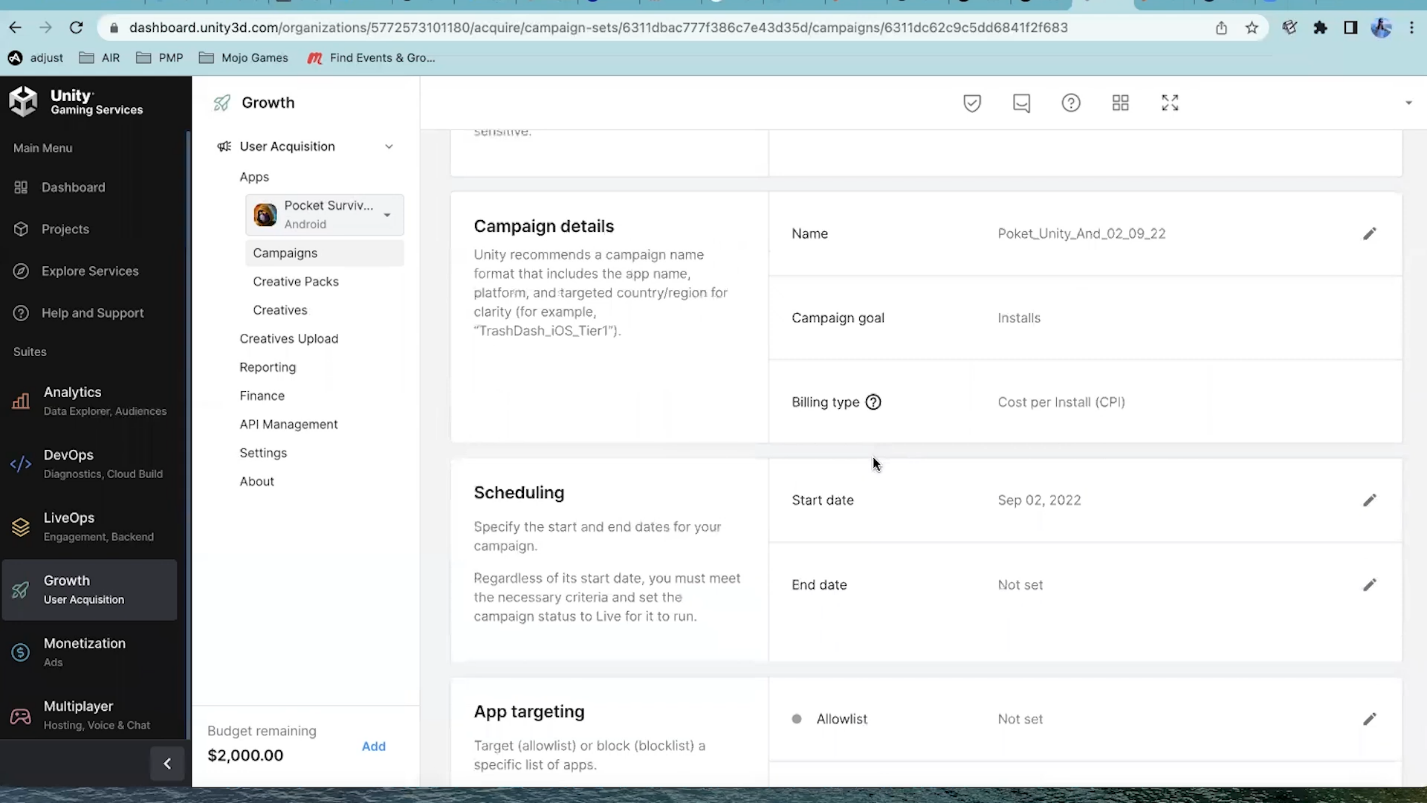
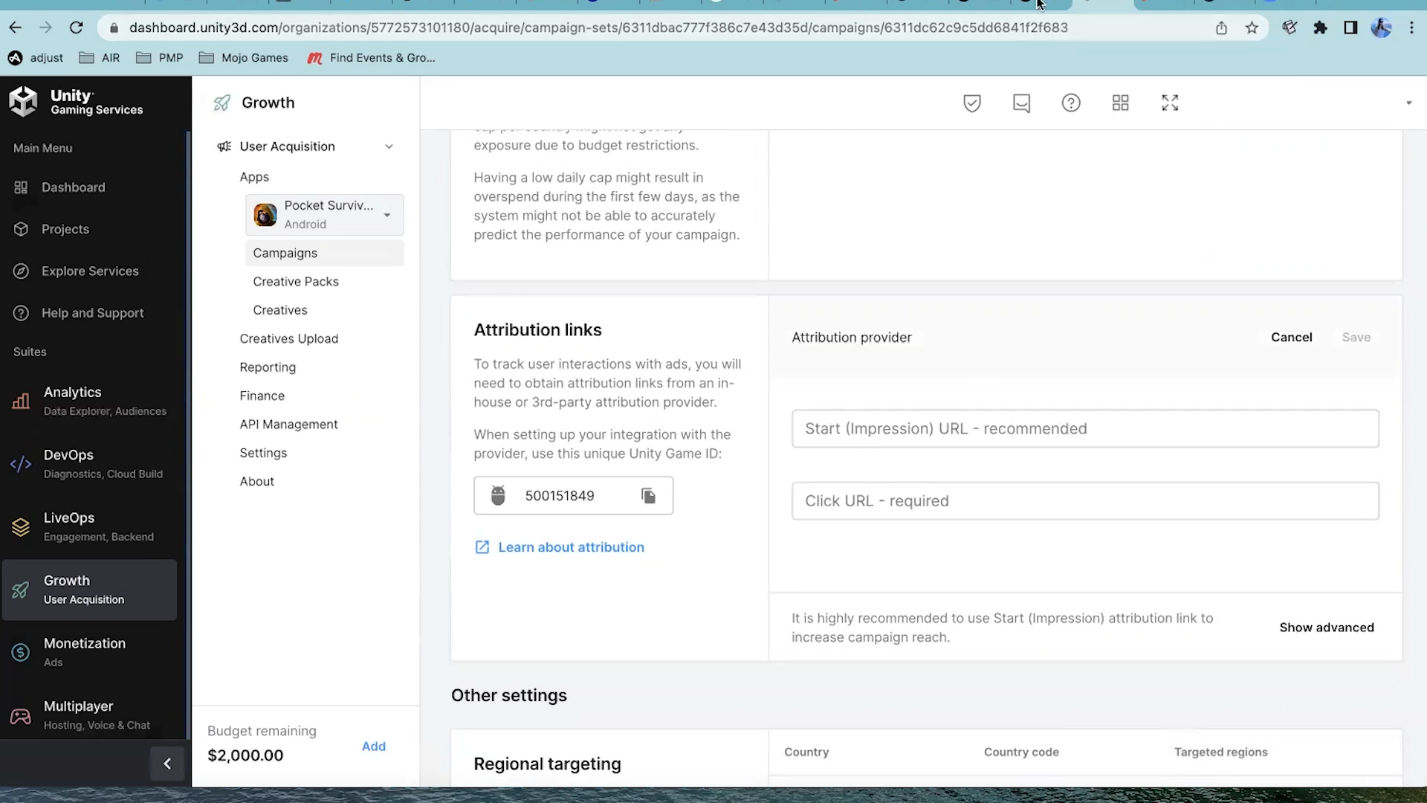
The remaining steps are to configure the links for attributing events in the app and set the budget. At the same time, the availability and effectiveness of optimized objectives also depend on the accumulated volume of post-install data. Therefore, new campaigns often start with Install optimization, and then move to Event Optimization or ROAS after enough data has been accumulated.
How Does Traffic Buying Work?
Campaign reach depends on eCPM, which is determined through the conversion from impressions to installs and the CPI. This is an internal Unity Ads metric calculated based on your bid and the predicted probability of conversion. For example, if you get 5 installs from 1,000 impressions and your CPI bid is $3, the estimated eCPM will be $15. As the bid or the probability of conversion increases, eCPM will also increase. In the Unity auction, campaigns are evaluated based on estimated eCPM: it is influenced by both the bid and the predicted probability of conversion. The higher the estimated eCPM, the better the chances of getting impressions.
In this case, eCPM is an internal metric used to calculate the position in the auction. The advertiser does not pay for 1,000 impressions — the actual payment is made according to the selected pricing model, for example, per install or another target action.
For CPE and ROAS, the system also uses predictive models, but optimization is no longer built solely around the install. Instead, it focuses on the target event or the predicted value of the user. Unity explicitly states that CPI, CPE, and ROAS are different strategies designed for different campaign goals. The more accurately events and user value data are passed through the MMP, the more information the algorithm has to optimize the campaign.
Analytics and Events
When working with Unity Ads, it is important to properly configure the MMP — a third-party attribution platform that connects installs and subsequent user actions within the app to advertising campaigns. Through the MMP, Unity receives data on user acquisition and post-install behavior, which it then uses to optimize campaigns.
Unity Ads needs two main types of data:
- Data on ad interactions, showing how users respond to ads through the number of impressions, clicks, and installs.
- Post-install data, which allows the quality of the acquired audience to be evaluated. This includes sessions, purchases, ad revenue, and other events that occur within the app.
If a campaign is optimized for a deposit, purchase, or another target action rather than an install, this event must be correctly passed to Unity through the MMP. Without this data, it will be more difficult for the algorithm to evaluate user quality and optimize media buying.
That is why, before launch, it is worth checking the attribution setup, event tracking, and the accuracy of the data being sent to Unity in advance. The more accurately the system receives information about post-install user behavior, the more data the algorithm has to optimize the campaign toward the desired action and traffic quality.
Pre-Launch Checklist for iGaming
Before launching an advertising campaign in Unity Ads, it is worth checking several things that directly affect the ability to launch and optimize the campaign going forward.
- Creatives. At least one approved Creative Pack should be available. All new creatives go through manual moderation. Video and playable ads must also comply with the technical requirements for format and file size.
- Campaign objective. You need to determine in advance what exactly the system should look for: installs, a specific event, or users with a predicted value. ROAS and Event Optimization require data on post-install actions.
- MMP and attribution. For successful campaign optimization, make sure the MMP is passing the required events to Unity.
- GEOs and bids. Check the selected GEOs and bid settings for each of them. Depending on the campaign objective, CPI, CPE, or ROAS models are used, while with automated CPI, bids can be dynamically adjusted by the algorithm.
- Budget. The account should be funded before launch, and both a daily and overall campaign budget need to be set.
- Targeting. Check the audience settings, countries, app sources, devices, and app categories. It is not recommended to narrow the audience too much at the start.
After launching the campaign, it is important to look not only at the number of installs but also at user quality and the performance of individual creatives. Unity provides reports at both the campaign and creative levels, which can be used for further optimization.
Conclusion
If the technical setup and analytics are configured correctly, Unity Ads allows you to optimize not only for installs but also for users' subsequent actions. Before running your first test, it is worth checking the entire setup end to end and taking the specifics of working with iGaming on the source into account in advance.
If you need additional guidance, be sure to contact the RentAcc managers. Their experience can help resolve any issues both at the testing stage and during scaling.
The RentAcc technology-driven CRM platform simplifies working with the source and handles key operational tasks. From a single interface, you can configure automation rules, track balances and campaign statuses, receive notifications, and manage roles within the team.
 Share this post