



Meta has launched the Value Rules feature in Ads Manager, which allows advertisers to manage bids based on the value of different audience segments. The first ad accounts gained access to it at the end of May 2025, and now the feature is available to most ad account owners.
The core idea behind Value Rules is that you can tell the algorithm which users are a priority for you. Facebook will then bid more aggressively according to the specified parameters, reallocating budget in favor of the selected audience. This is especially relevant for affiliates working with e-commerce or apps with subscriptions and in-app purchases.

At the same time, the tool is still underestimated. Many people either don’t fully understand how it works in practice or use it incorrectly, which is why they don’t see performance growth. That’s exactly why the RentAcc team prepared a detailed overview of Value Rules, focusing on settings and real-world use cases in ad campaigns.
What Are Value Rules in FB?
Value Rules is a dedicated feature in Ads Manager that allows you to influence auction bids depending on the value of specific audience segments. Simply put, you can define in advance which users matter more to you, and the system will place more aggressive bids for them.
For example, if you know that men aged 35–44 generate more revenue than other segments, you can increase the bid for this audience by 20%. During the auction, Facebook will take this preference into account. Rules that reduce bids also work and can be set within the value definition settings.
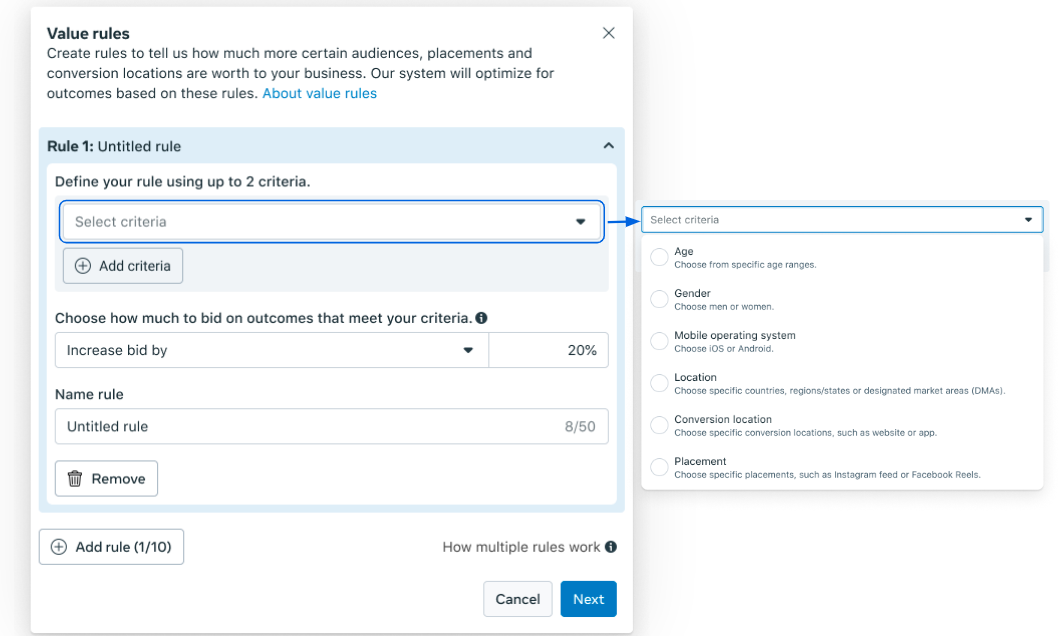
If you don’t apply any value rules, the algorithm will operate using its standard logic. Value Rules simply provide additional context. Even if the purchase revenue is technically the same, you can show the system which users are more valuable to you — those who may have higher LTV, a higher average order value, or a greater likelihood of making repeat purchases.
This tool is not mandatory, especially if you’re just starting out in affiliate marketing and don’t yet have reliable data on your audience segments. But at the scaling stage, when you already understand your unit economics and audience behavior, Value Rules become a powerful lever for improving campaign performance.
With Value Rules, you can:
- set conditions that reflect the real value of different audiences, placements, and sources — the system will optimize bids based on these priorities;
- show ads more often to the segments that matter most to you, increasing overall campaign efficiency;
- increase LTV by raising bids for audiences with high lifetime value;
- apply different rules to audiences, placements, and conversion sources within a single ad set, effectively combining the logic of multiple campaigns into one.
The main advantage of Value Rules is that the algorithm shifts bids toward the most valuable audience, rather than simply chasing cheap clicks. Previously, if you needed different approaches for GEOs, devices, or demographics, you had to complicate campaign structures: create separate ad sets, duplicate campaigns, and manually control bids. Value Rules solves this automatically — you define the rules, and the algorithm adjusts bids during the auction. As a result, the focus moves away from surface-level metrics toward real bottom-of-the-funnel indicators such as LTV and overall profitability.
The feature has already received its first important update: a new *“Device platform”* parameter has appeared in the settings. Now, when adjusting bids, you can take into account whether the user is on mobile or desktop. Value Rules can also be applied to conversion location, geography, age, gender, ad placement, and mobile operating system.
How to Set Up Value Rules in Meta Ads Manager
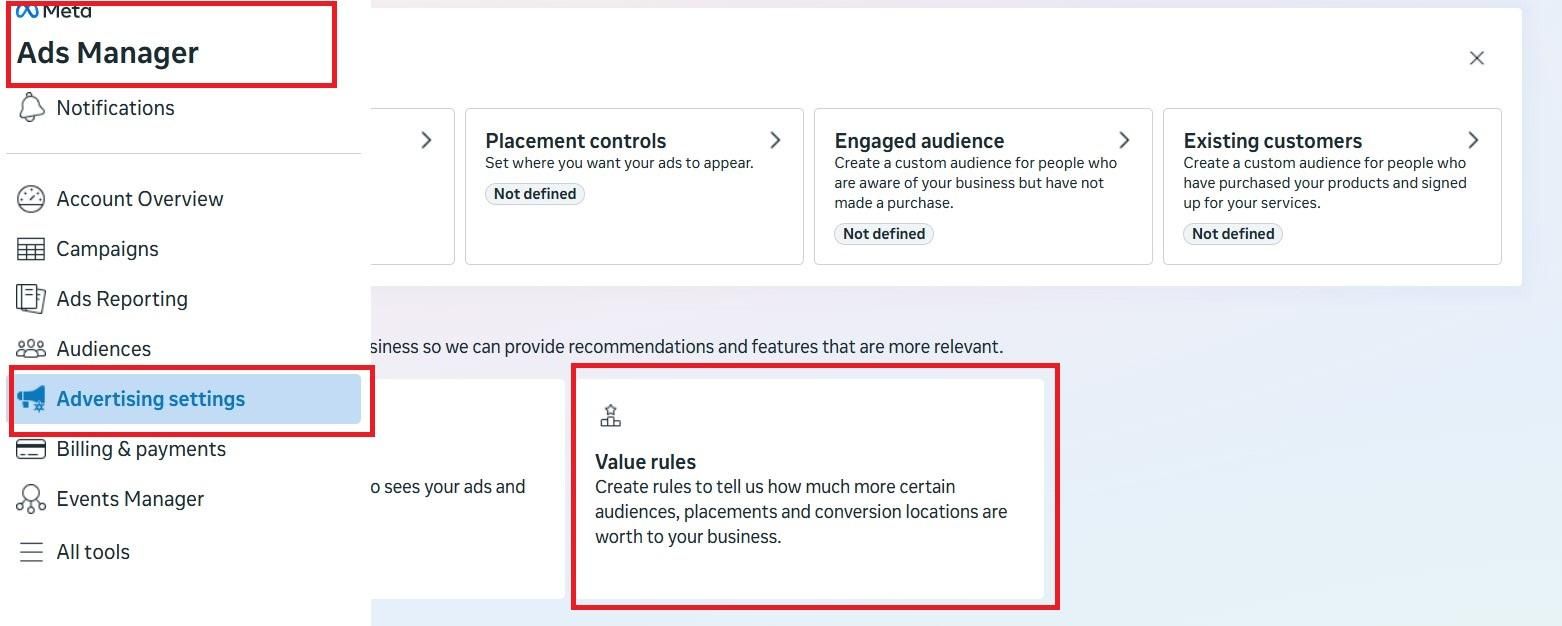
The setup is done directly in Ads Manager. To access the required section, open Ad Settings and find Value Rules.
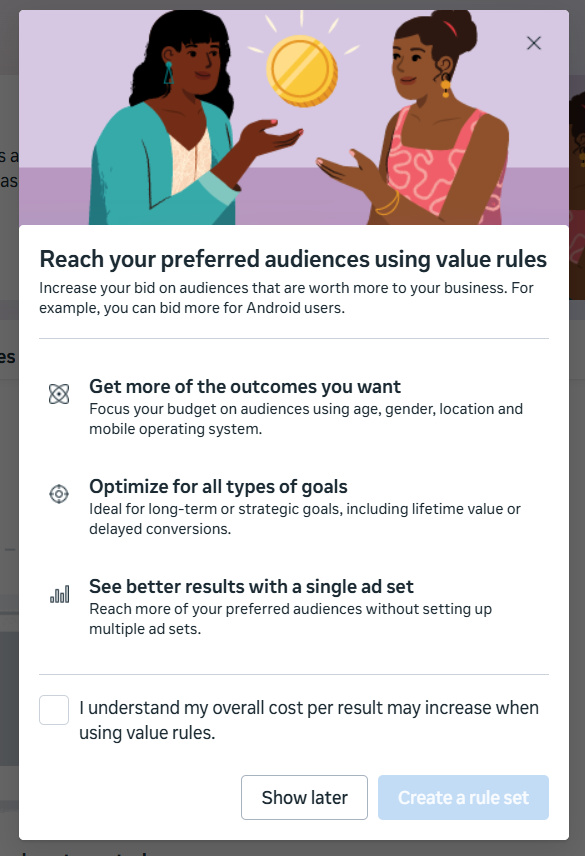
Next, click Create rule set. Before creating it, the system will show a brief explanation of how value rules work and ask you to confirm that you understand the risks — using Value Rules may lead to higher costs, since the algorithm will start bidding more aggressively for priority segments.
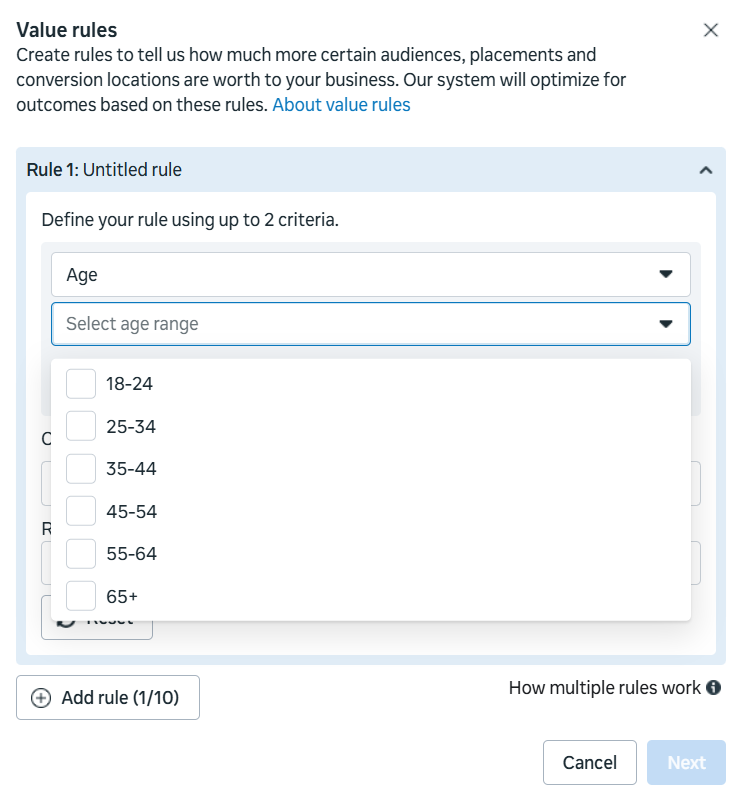
After that, you can proceed to creating your first rule. At this stage, you select the criteria that will trigger the bid adjustment. Each rule can include no more than two criteria at the same time. For example, if age is critical for you, you can select a specific age range to which the rule will apply.
Then you define how the selected criterion should affect the bid — increase or decrease it. Adjustments are set in percentages. Meta allows you to increase bids by up to +1000% or decrease them by up to 90%.
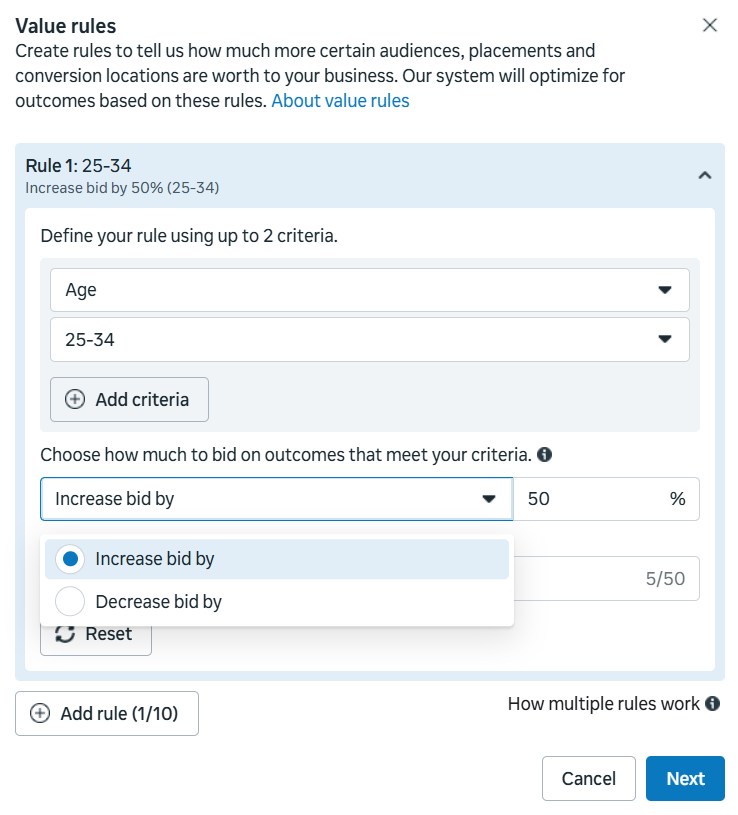
If needed, you can create multiple rules within one rule set. To do this, click Add rule and repeat the same steps. A single rule set can include up to 10 rules.
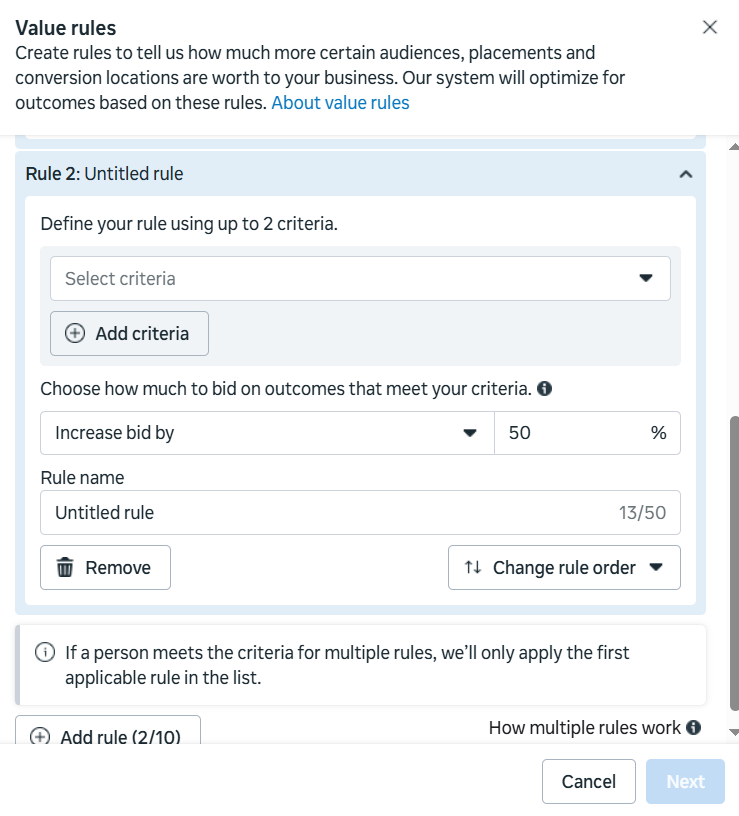
It’s important to consider the rule priority. If a user matches multiple conditions at the same time, the system will apply only one rule — the one placed higher in the list. To change the priority, you can manually reorder rules using Change rule order.
How to Create a Campaign With Value Rules
Creating Value Rules alone does not mean they will start working automatically — and this is more of an advantage than a drawback. You can enable rules only where they are actually needed.
Value Rules are not available for all campaign types. They can be applied when using the Sales and App Promotion objectives. They are not available for special ad categories related to real estate, employment, or financial products and services.
To launch a campaign with Value Rules, first create a new ad campaign and go through the standard setup steps. At the second stage, you’ll see the Value Rules section, where you can select the required rule set from those created earlier.
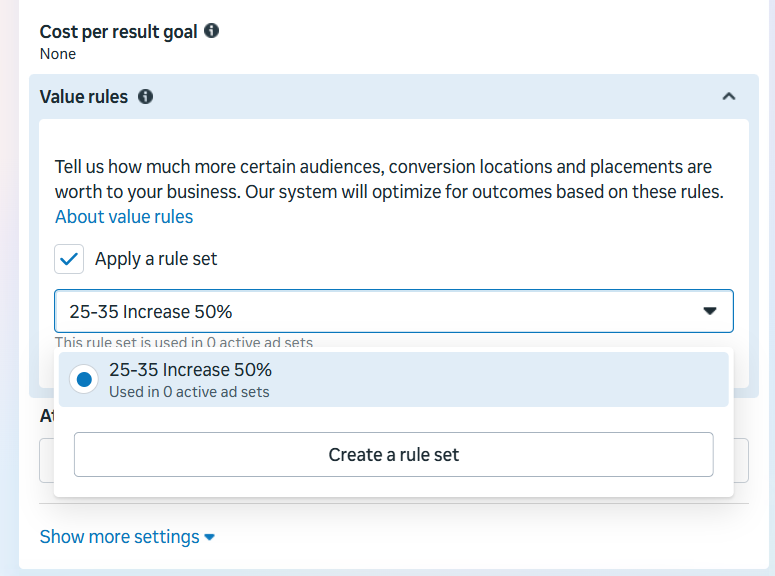
Next, you configure the audience. If you apply value rules at the ad set level, it’s recommended to use a broad audience. If audience restrictions conflict with the selected Value Rules, Facebook Ads will show an error and won’t allow the rule to be applied.
Recommendations for Choosing the Optimal Value Rules Percentage
Once this feature is enabled, the algorithm starts prioritizing the segments and actions you defined as more valuable. However, incorrectly calculated adjustments may lead to an increase in average conversion cost. That’s why the key question is how much to adjust the bid by — and the answer should be based on real data.
Understanding LTV, ROAS, profit, and ad payback allows you to realistically assess which audience segments actually generate revenue. Try to describe your most valuable customer using available parameters: age, gender, geography, mobile operating system, or device type. These are the segments where it makes sense to shift Meta’s algorithmic focus.

If you see that a specific audience consistently makes higher-value purchases or shows better profitability, this is a clear signal to increase bids. For example, if women generate an average ROAS of $115 and men $100, you can assume that the female audience is roughly 15% more valuable. In this case, setting a +15% adjustment in Value Rules is a logical step.
Special attention should be paid to tracking. Without proper tracking of lead quality or app installs, Value Rules can’t be set up effectively. If you notice that part of your leads consistently shows low quality, try to identify patterns and group them by age, gender, or device type in order to reduce bids in the value settings.
If you’re not sure where to start, a safe and reasonable option is to begin with 10–15%. Then, based on performance, you can strengthen or weaken the impact of the rules.
By the way, Meta has released a useful guide on Value Rules with testing hypotheses. It’s rarely mentioned in reviews, but the material is genuinely helpful.
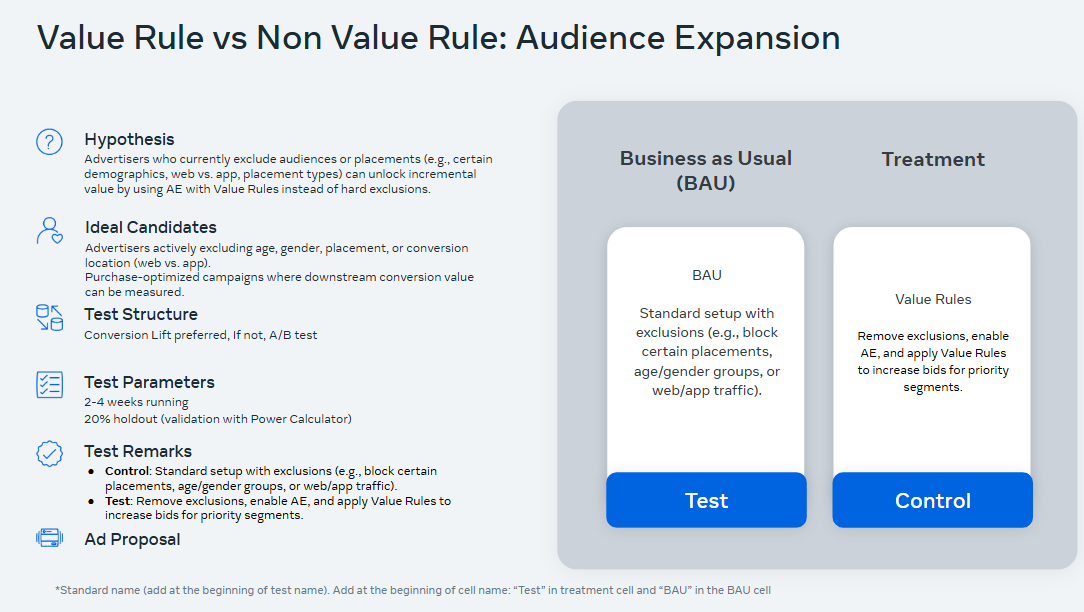
After launching Value Rules, it’s crucial to closely monitor results. Effectiveness should be evaluated not by clicks or CPM, but by growth in LTV, ROAS, and net profit. Additionally, in Ads Manager you can use breakdowns by value rules at the ad set level. This allows you to see how each rule performs individually and which segments actually influence the final outcome.
How to Apply Value Rules in the iGaming Vertical
The first step is collecting and analyzing data. Check the affiliate program statistics or request information directly from the advertiser to understand which players stay active longer and generate more revenue, which countries they come from, their age, and which devices they use. If detailed segmentation is unavailable, you can at least rely on the average first deposit amount — in many cases, this alone is enough to form a solid working hypothesis. Let’s break down how to build these hypotheses and set value rules using practical examples.
Age
For example, you may see that men aged 35+ install the app 20% less often than users aged 18–24, but their deposits are on average 2–3 times higher. This means this audience segment is more valuable for you. Based on this insight, you can formulate a hypothesis and increase the bid by 15% via Value Rules using the 35+ age criterion combined with male gender.
GEO
If you are running campaigns in several similar GEOs, you can start setting priorities after just a few days of testing. Let’s say the campaign is running simultaneously in Austria and Germany — markets that are similar in terms of language and culture. However, the data shows that German players have higher LTV and make larger deposits compared to Austrian players. Instead of stopping the campaign and rebuilding the structure, you simply set value rules: +30% value for Germany and –15% for Austria. As a result, Facebook automatically reallocates the budget toward the more profitable GEO, without completely excluding the other audience from the algorithm.
Device
iOS users are generally more attractive for the gaming niche due to higher purchasing power. With Value Rules, you can increase the value of iOS users by 20% and shift the algorithm’s focus toward them, without fully cutting off the Android audience.
Working with Value Rules is always hypothesis-driven. If a test delivers positive results, the rule can be transferred to the main campaign and reinforced — for example, by increasing the value adjustment from 15% to 25%. If the hypothesis is not confirmed, that is also a valuable outcome, achieved with minimal risk and without a full campaign rebuild.
Conclusion
It’s important to understand that Value Rules do not guarantee instant conversion growth. What they do offer is control over audience prioritization and budget redistribution, helping you surface potentially high-value players. You can adjust percentages at any time, disable individual rules, or remove them entirely based on campaign performance data. When used correctly, this tool saves both time and money: instead of running dozens of fragmented tests, you selectively strengthen the right segments and reach a paying audience much faster.
If you want to test this feature yourself, it’s best to do it through RentAcc — a platform for managing Facebook advertising. We support campaign launches and help with the technical setup of ad accounts and optimization tools, so you can focus on building and scaling converting funnels.
 Share this post