
The mobile advertising market continues to grow, and Unity Ads remains one of the most popular platforms for mobile app monetization and user acquisition. With the launch of this source on the RentAcc advertising platform, we decided to release a detailed guide covering the key features of Unity Ads, available ad formats, and the specifics of working with the platform. We’ll also cover recommended launch budgets and ways to expand reach through placement management. This information will definitely be useful for those who have been wanting to test this source for a long time.
What is Unity Ads
Unity Ads is an advertising network by Unity, the company behind the eponymous game engine. According to the company, more than 70% of the top 1,000 mobile games are built with Unity, and made-with-Unity games receive around 3 billion mobile downloads per month on average.
Although Unity Ads was originally created for game promotion, it now works effectively for advertising non-gaming apps as well. The platform supports targeting by GEO, interests, and device types. After launching a campaign, ads are automatically shown inside games and apps connected to Unity. The majority of traffic comes directly from the Unity ecosystem, providing access to millions of mobile devices worldwide. Ads appear directly during gameplay: after a loss, when receiving a reward for completing a level, or when navigating through the menu.
It is important to distinguish between Unity Ads User Acquisition and Unity LevelPlay. Unity Ads UA is used by advertisers for traffic acquisition, while LevelPlay is a solution that allows app developers to manage monetization and connect multiple ad networks. Some Unity inventory is connected to the broader mobile app and gaming ecosystem, but campaigns are still launched through Unity Ads UA tools or available programmatic/DSP integrations.
For buying traffic, you can use Source Bidding — a tool that allows you to adjust bids for individual source app IDs by country. We should also highlight the convenient ad launch interface. The Unity Ads dashboard is simple and easy to understand, with a built-in dashboard featuring basic metrics. Get an agency account through RentAcc and enjoy convenient ad management through a technological CRM platform.
Unity Ads in Numbers and Facts
The platform reaches around 2.5 billion devices across 128 countries worldwide. The network processes more than 100 billion ad impressions per month, distributed across thousands of games built on the Unity engine. This makes it one of the largest advertising ecosystems and a stable traffic source.
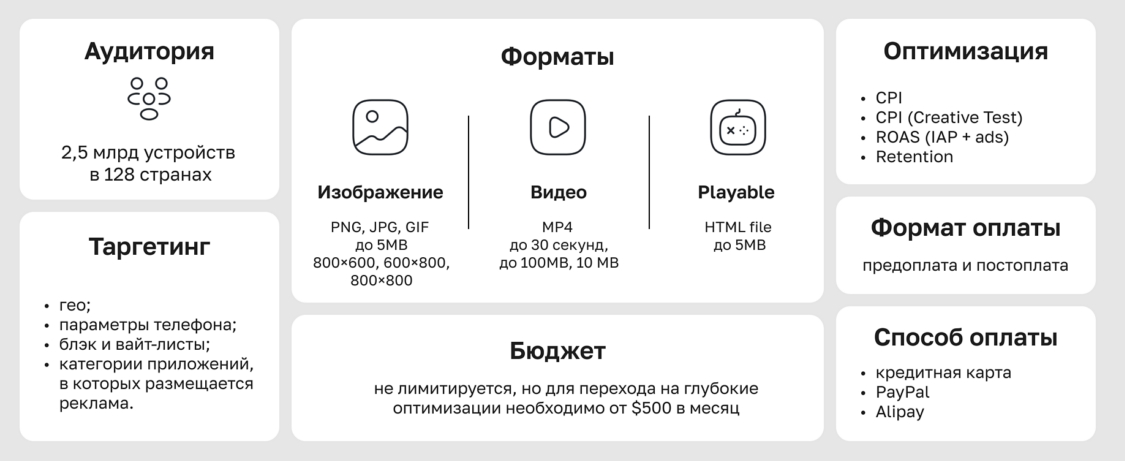
The main buying model is CPI (cost per install). However, other optimization options are also available, including CPA and ROAS. In practice, media buyers more often launch campaigns optimized for in-app events: for example, registrations or deposits. If needed, the RentAcc team can help set up your campaign correctly and choose the optimal strategy based on your goals.
When it comes to bidding strategy, the system can optimize bids automatically, or you can set bids manually. With auto-optimization enabled, algorithms adjust bids themselves to maximize installs within the given budget. The manual mode is based on a fixed install price. In practice, buyers often use Max Bid with around a +20% margin above the target CPI.
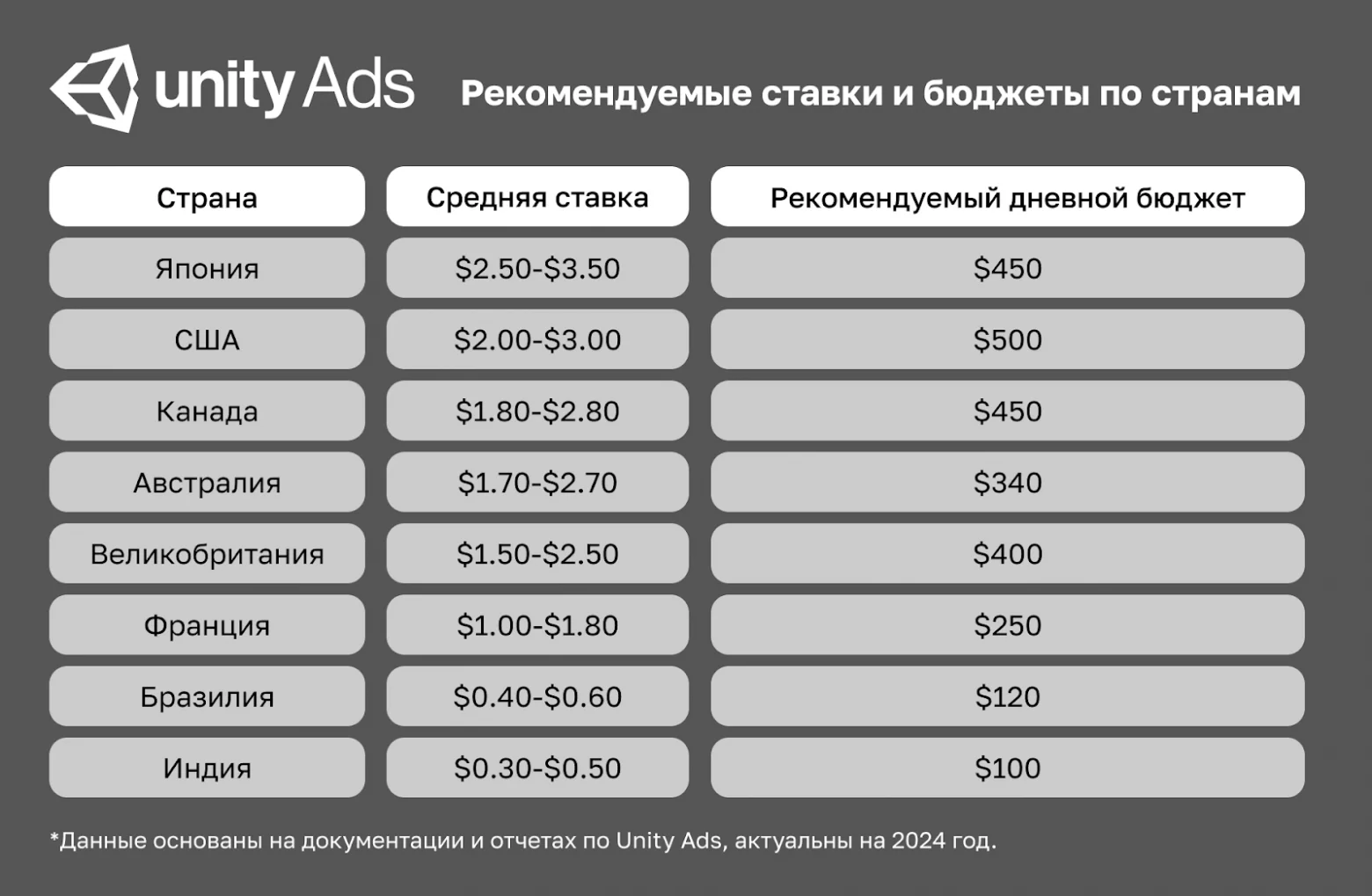
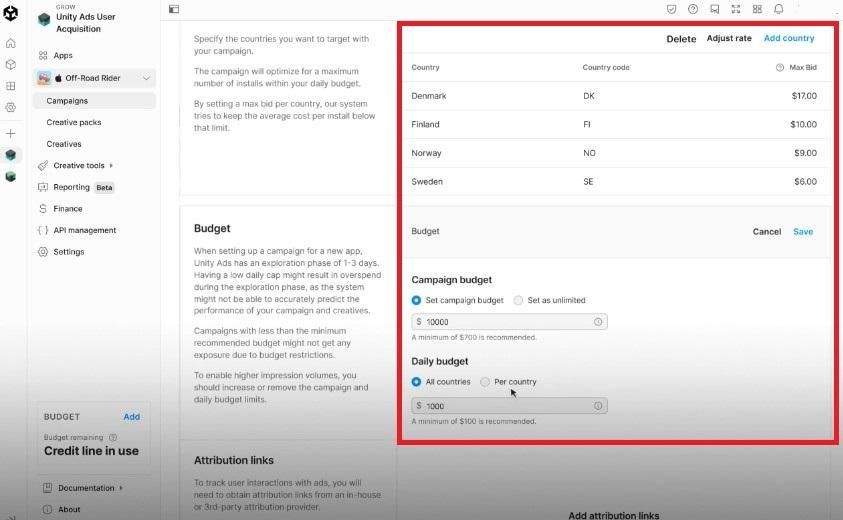
According to official Unity data, the minimum account top-up amount is $1,000. For a successful start on Tier-1 markets, larger budgets should be considered: the required budget depends on the GEO, bid, campaign objective, and number of creatives. When calculating the necessary campaign budget, teams usually consider the ratio between the daily budget and the average bid. Recommended bids and budgets by country from Unity Ads can be seen in the screenshot below.
Unity Ads Ad Formats
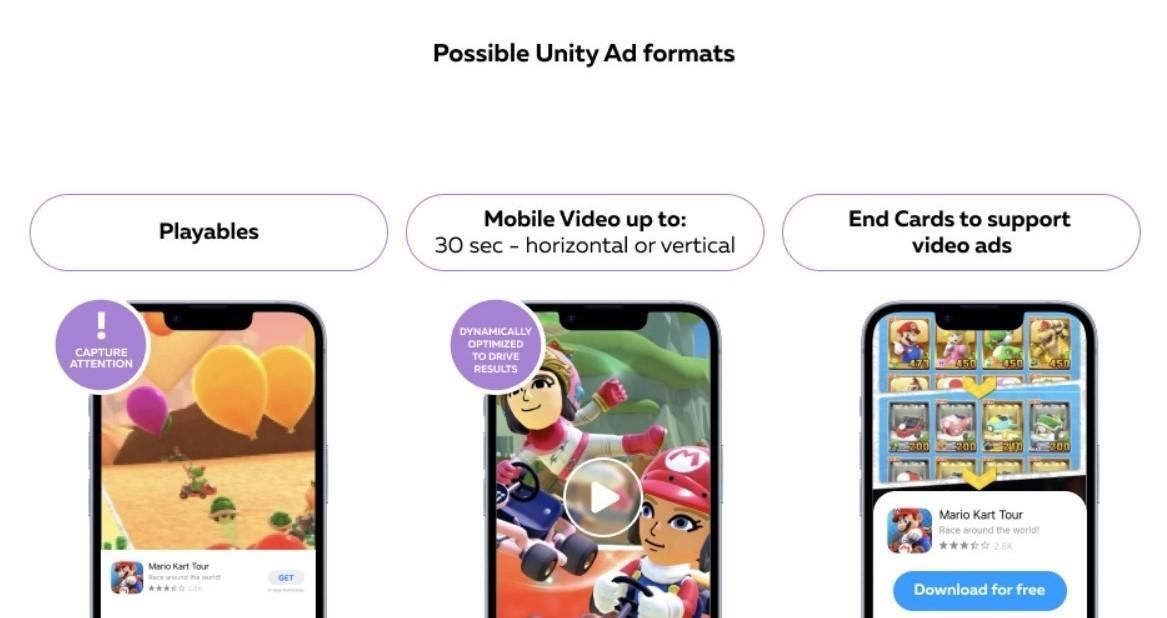
The platform works with three main creative types — banners, videos, and playable ads. In the context of Unity Ads, banners refer to static images or end cards — the final screen with a CTA shown after the ad and leading users to the app install.
| Static Images | Video Ads | Playable Ads | |
|---|---|---|---|
| Description | Static images or final screens with CTA | Video | Interactive ads |
| Format | PNG, JPG, or GIF | MP4 | HTML |
| Requirements | Allowed sizes: 800×600, 600×800, 800×800. Maximum file size up to 5 MB. | File size up to 100 MB. Resolution 9:16 and 16:9, up to 60 seconds. Videos from 30–60 seconds are currently in beta/long video ads and may have limitations. All Video Ads must include an end card. | Maximum file size up to 5 MB. |
All creatives can be combined, and one campaign can include multiple ad sets. One app can also use multiple Creative Packs distributed across different campaigns.
How to Launch Your First Campaign with Unity Ads
There are several ways to buy traffic from the Unity ecosystem. The first option is directly through the Unity Ads User Acquisition dashboard, where advertisers add an app, creatives, bids, budgets, and attribution links. The second option is through programmatic tools and DSPs if the required inventory is available through the corresponding integrations. In this article, we focus specifically on launching campaigns through Unity Ads.
When registering an account independently, keep in mind that moderation is stricter. You need to prepare a set of documents, offer description, links, and materials for verification in advance. Additional checks for each creative by the support team may also be required. Working through an agency account usually provides more stable optimization. When connecting through RentAcc, the advantages become obvious: account access is provided quickly, and a manager helps with the technical setup, creatives, and moderation process.
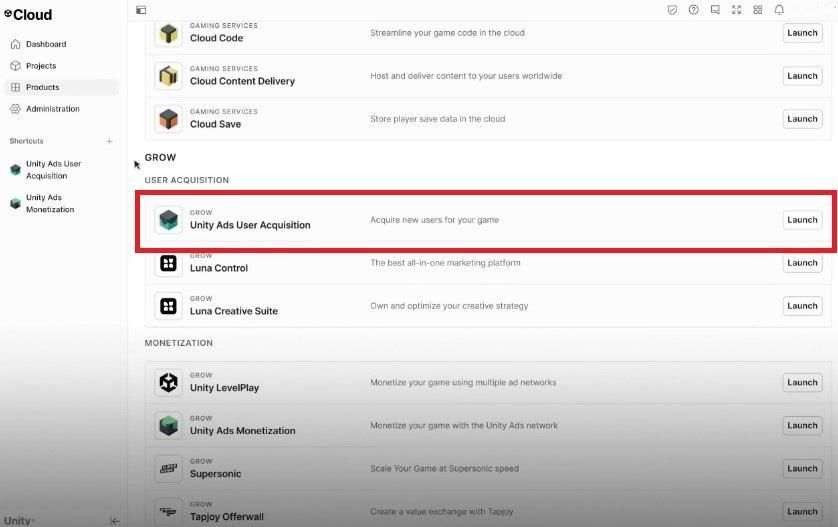
After receiving access to an agency account, you can move on to launching your first advertising campaign. If you are not a developer but a media buyer and want to buy traffic through Unity Ads, you first need to create a project in Cloud. This is a mandatory step — without a project, access to the advertising dashboard will not be available.
The next step is adding the app you want to drive traffic to. Go to the Growth tab and open the relevant section — “Unity Ads User Acquisition”.
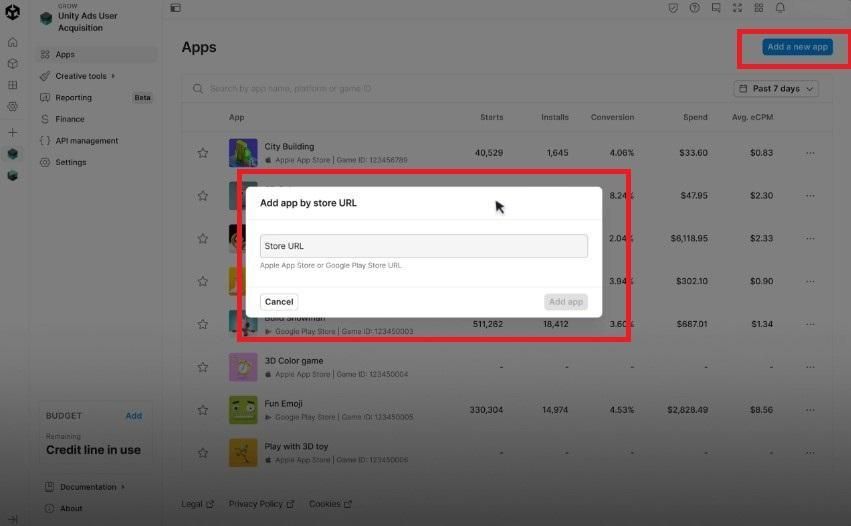
Add the app that will receive traffic through the “Add a new app” option. Simply paste the link from Google Play or the App Store.
Set up conversion tracking inside the app. If you need help with the technical aspects of integration, you can always contact your manager.
Go to the Apps tab, select the app, and click “Create a campaign”.
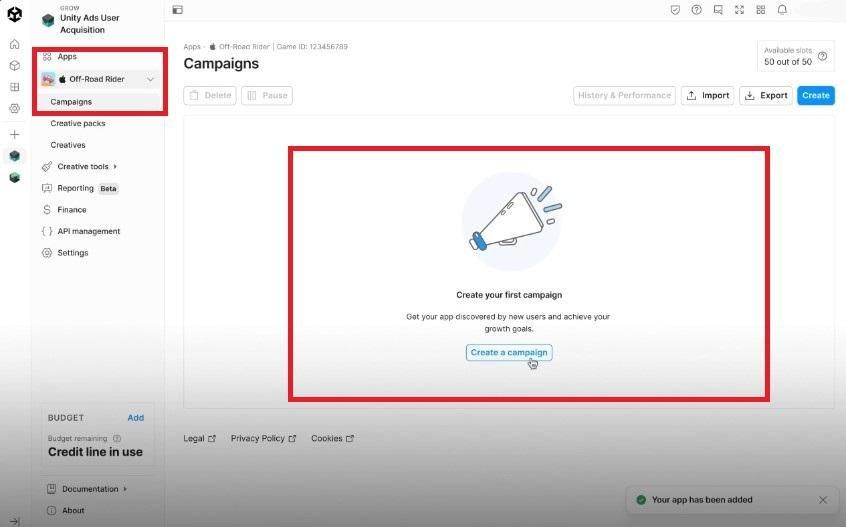
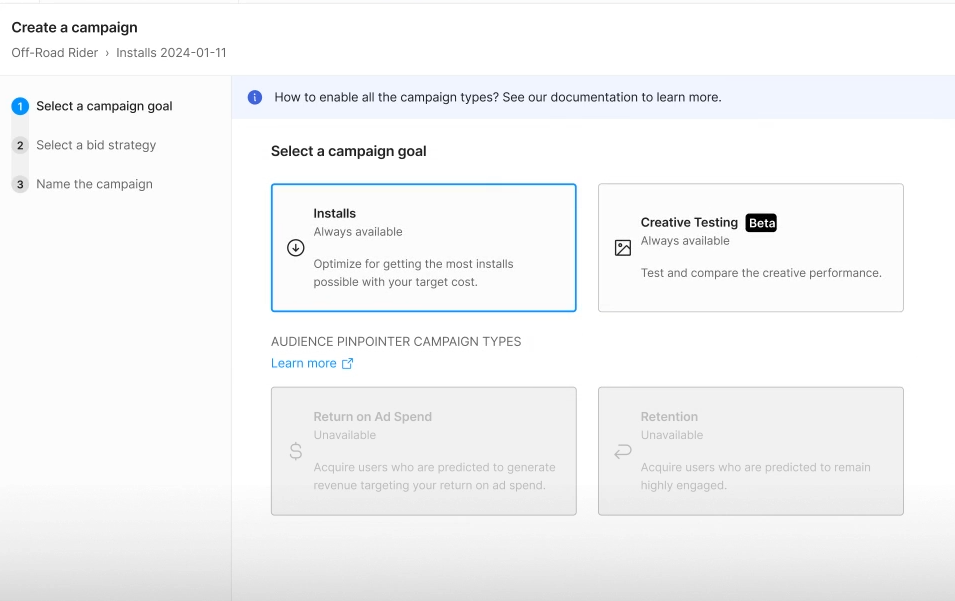
Choose the campaign goal — Installs.
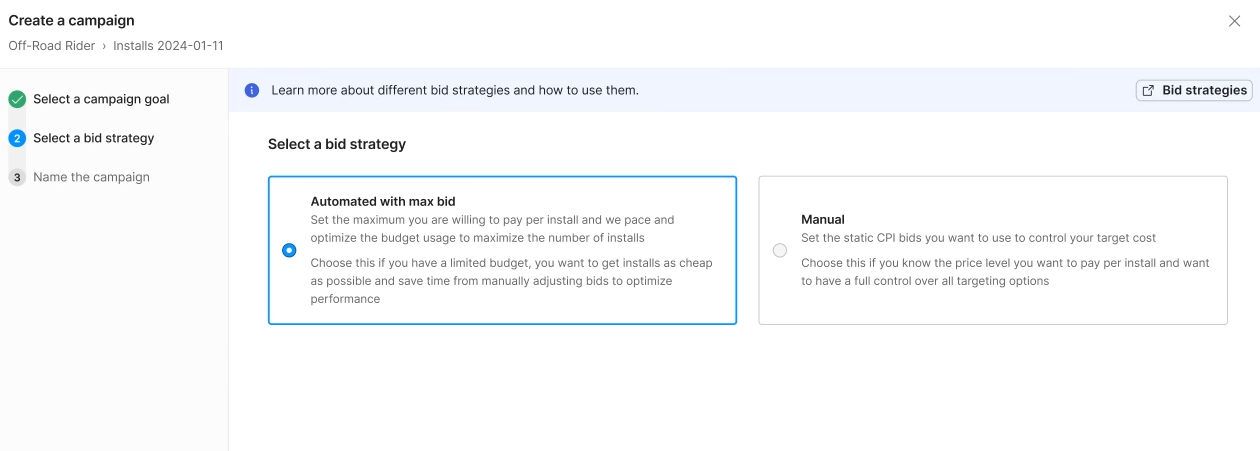
Select a bidding strategy:
- Automated with max bid — an automated strategy with a maximum bid.
- Manual — a manual strategy where you set a fixed install price yourself and control bids.
Prepare creatives and upload them through Creative Packs.
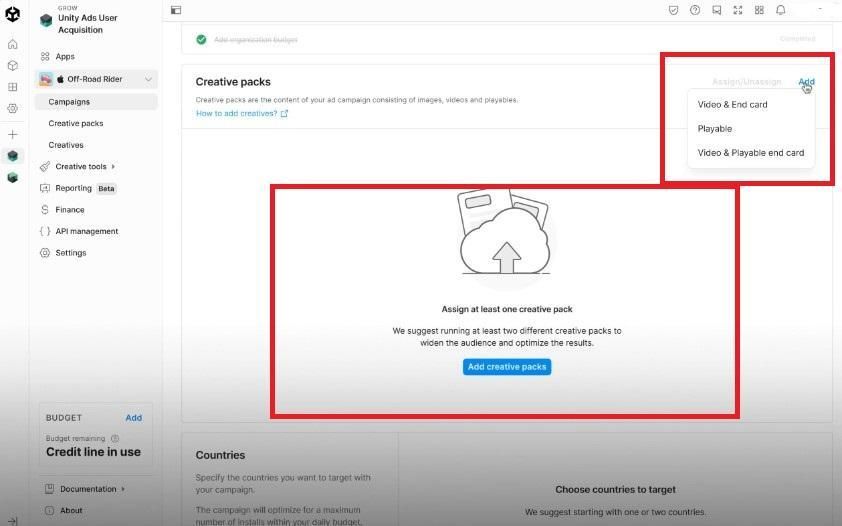
Make sure to specify the pack name and the creative language (this parameter is important for moderation).
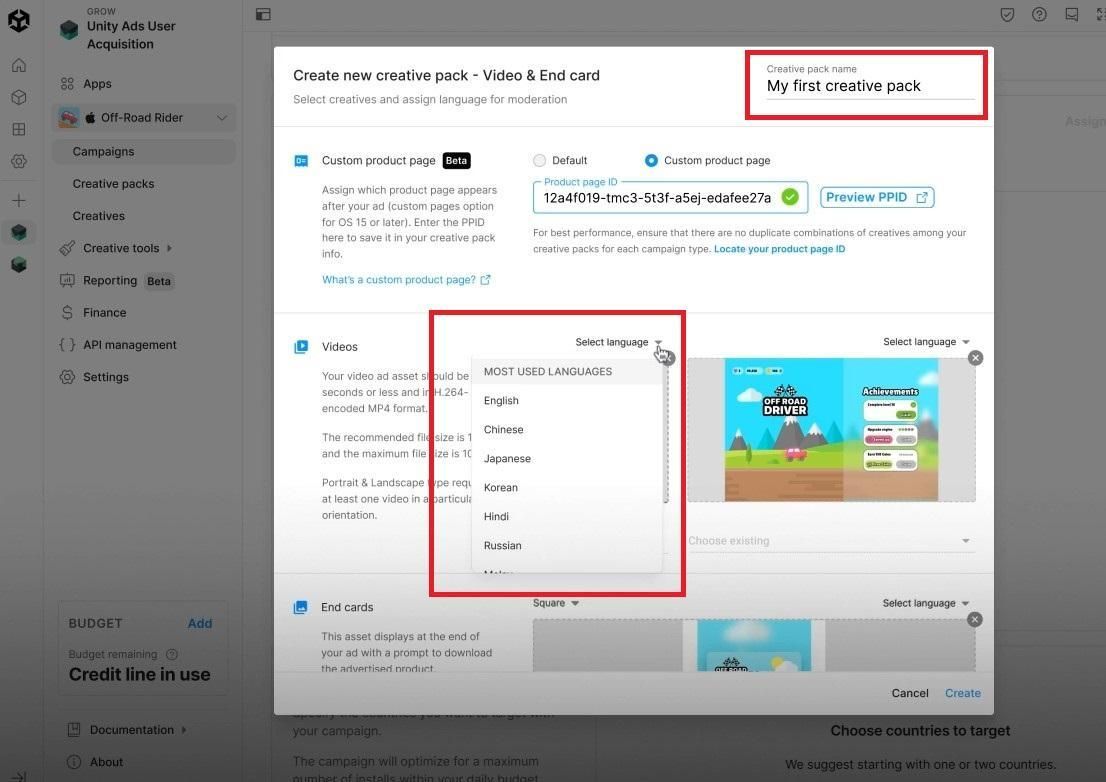
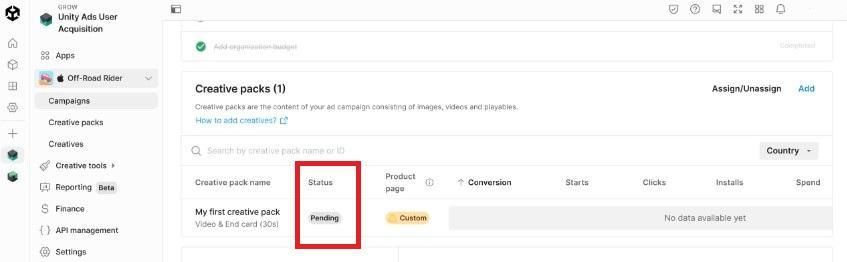
After creatives pass moderation, you can proceed with creating the ad.
Set up targeting: available options include filtering by countries and regions, placements with separate bids, and devices. The last point deserves special attention — always check which OS versions your app supports. The same applies to GEO targeting. It is not uncommon for advertisers to launch campaigns where users physically cannot install the app, resulting in wasted budget.
Additionally, you can use allowlists and blocklists to manage traffic quality and optimize ROI. Unity Ads provides a reporting/analytics dashboard, and data can also be accessed through the Advertising Statistics API. The final step is setting up attribution links for events.
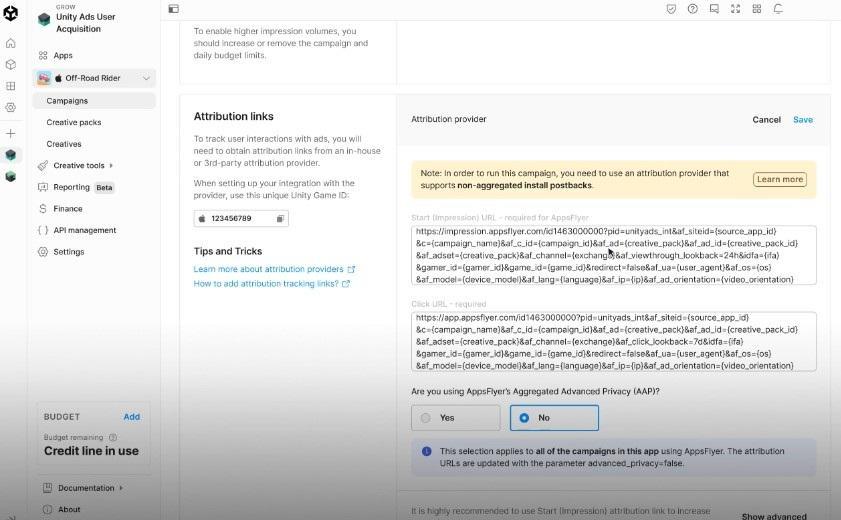
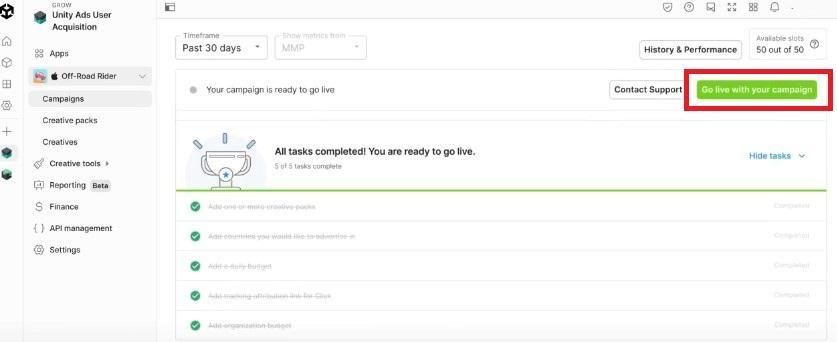
Before launching a campaign in Unity Ads, make sure you have completed all required steps: uploaded creatives, selected target countries, set the budget, and added tracking links. Only after this will the “Go live with your campaign” button become active.
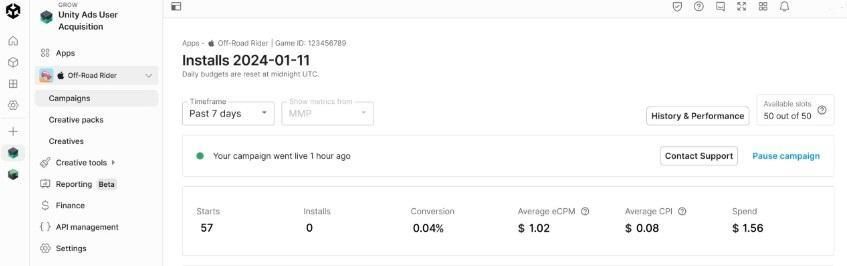
Everything is ready — the Unity Ads campaign starts running, and you can monitor a quick summary of conversions, installs, CPI, and spend.
Tips for Successful Scaling
If a campaign is launched but receives almost no traffic, the first step is usually increasing the bid. If the bid is too low, the system will not enter the auction with enough volume.
During the algorithm learning period, you can add new creatives and monitor performance dynamics — the system may simply be searching for the right audience.
Scaling successful Unity Ads campaigns usually happens through:
- increasing the budget of already-performing campaigns;
- adding new creatives;
- working with allowlists and blocklists.
Campaign duplication is sometimes used, but this method is unstable. A common issue with this approach is a sharp drop in spend on duplicated campaigns compared to the original campaign — sometimes by several times.
Conclusion
Unity Ads is one of the leading traffic sources for mobile apps. The platform allows precise targeting and effective work with mobile advertising. To unlock the full potential of the network, it is important to consider creative specifics, work with blocklists, and test different strategies.
If you still have questions about campaign setup, you can contact RentAcc managers for assistance. We help with configuration and provide recommendations for your campaigns to ensure a successful launch.
 Share this post