


Affiliate marketing has long outgrown the "launch — check — tweak" cycle. When you're managing dozens of Ad Groups, hundreds of creatives and multiple GEOs simultaneously, decisions inevitably come too late, budget simply vanish out, and growth opportunities get missed.
The problem isn't the buyer who can't keep up. The problem is not using tools that react faster than any human can.
RentAcc solves this with two built-in tools: AutoRules and an external API.
What AutoRules are and why you need them
AutoRules are decision-making algorithms for Moloco in-app ad campaigns. The concept is straightforward: if a condition is met → the system automatically takes an action.
Examples of these "if→then" instructions can vary widely:
- CPA rises above KPI → send a notification
- CTR drops below threshold → stop the ad group
- Balance < XXX → top up
- Spend > X with zero conversions → pause / cap spend
This makes the ad campaign more autonomous and the logic behind actions more consistent. It turns advertising from a manual process into a predictable system.
Building automation yourself through scripts is a separate project with its own cost:
- you need a developer who understands Moloco's logic
- you need time to design, write code and test
- you need ongoing maintenance: scripts break, the API gets updated, conditions change.
In the end, the team is spending resources again — not on traffic, but on keeping the infrastructure alive.
RentAcc removes this task entirely — the infrastructure is already built and maintained by a professional IT team.
RentAcc AutoRules: if→then logic without a developer
AutoRules in RentAcc are a traffic management automation system for Moloco. The principle is simple: you set the condition and the action, the platform monitors the metrics and handles everything on its own.
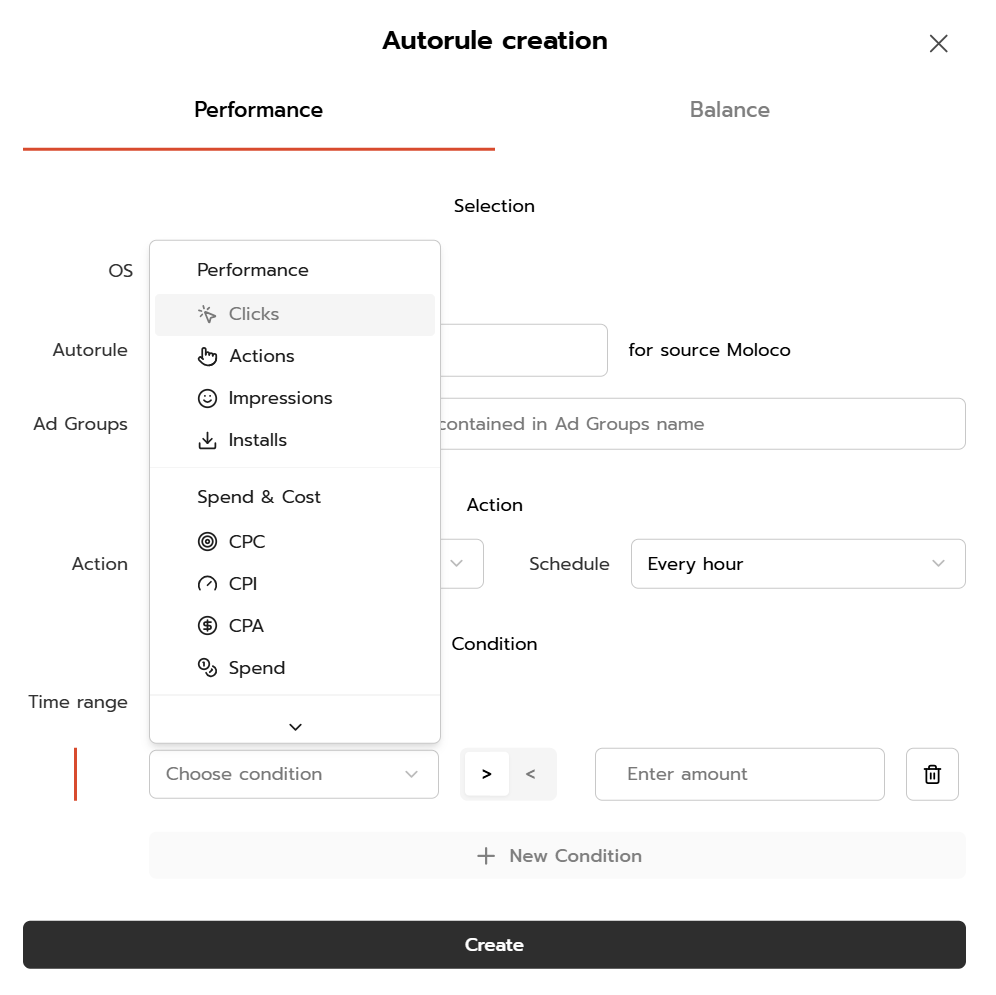
AutoRules are configured directly in the platform interface with no coding required — the "if→then" logic is set up through standard fields and dropdown menus inside the dashboard.
What can be automated
Stopping underperforming Ad Groups. If a group has collected enough data but the metrics don't fit the economics — the system stops it automatically. Budget stops flowing into a losing funnel.
Examples of working configurations:
- Spend > $100, CPI > $10 → Stop Ad Group
Schedule — every hour | Time range — today - Installs > 100, CPI > $4 → Stop Ad Group
Schedule — every hour | Time range — last 3 days - Spend > $50, Installs < 1 → Stop Ad Group
Schedule — every hour | Time range — today - Impressions > 5000, IPM < 2 → Stop Ad Group
Schedule — every hour | Time range — today
Available metrics:
- For Android: Installs, Clicks, Actions (deposits/purchases), Impressions, CTR, IPM, CPA, CPC, CPI, Spend
- For iOS: Clicks, Impressions, CTR, CPC, Spend
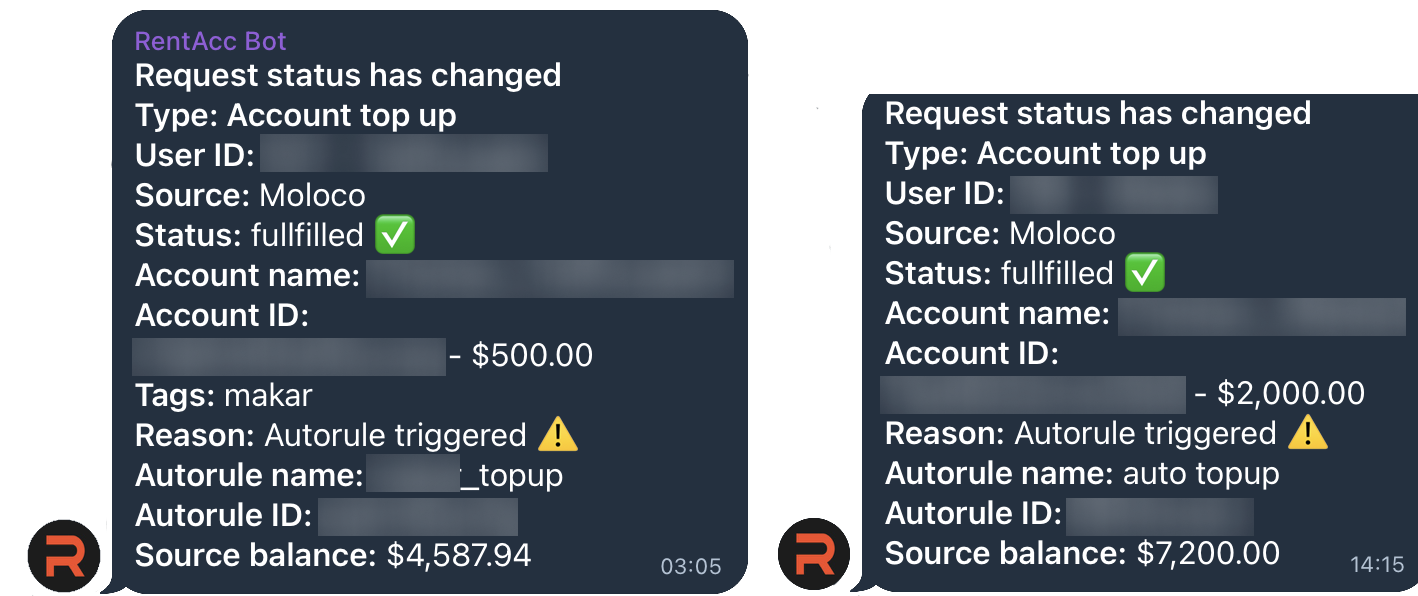
Balance control. Campaigns don't stop due to a zero balance — the system tops up automatically when a threshold is reached.
- Balance < $400 → Top Up $2000
The rule checks every 5 minutes. When triggered, a Telegram notification is sent with the top-up amount and current balance.
Two operating modes
Stop Ad Group — the system automatically stops groups that meet the condition.
Notify Me — a Telegram notification without auto-stop. Works well where manual review is needed before taking action.
Strategies can be combined: some rules run fully automatically, others only send a notification.
RentAcc API: data straight into your own infrastructure
Alongside AutoRules, RentAcc has launched an external API v1.0 — the ability to pull platform data directly into your own systems.
How it works
- Generate an API key inside the platform interface.
- Send HTTP requests to the endpoint.
- Get the response in JSON format.
What you can do
- Build your own analytics dashboards.
- Automatically push data into Google Sheets, BI systems, or a CRM.
- Monitor spend and account status without manual exports.
Available data for export:
Date, Account name, Account ID, Time zone, Account tags, Campaign name, Campaign ID, OS, Countries, Spend, Currency.
How this changes the buyer's workflow
Without automation, a buyer spends 6–8 hours a day on routine tasks: checking metrics, pausing weak groups, watching the balance. The system reacts with a delay — by the time it catches a drop, the budget is already gone.
With AutoRules and the API, the picture looks different:
- Unprofitable funnels get stopped within an hour, not the next day.
- Balance tops up automatically — campaigns don't stop overnight because of a zero balance.
- Data across all accounts is available in one place without manual exports.
- The buyer works on hypotheses and creatives instead of clicking through interfaces.
Automation doesn't replace the buyer — it removes the routine and gives back time for what actually moves the needle.
Bottom line
There's a lot of talk about Moloco automation on the market. Most solutions are scripts, external tools, and integrations that need to be maintained separately.
RentAcc builds automation directly inside the platform: AutoRules are configured in the dashboard with no coding, the API connects in minutes. The infrastructure is already ready — all that's left is setting the rules for your own funnel.
For API documentation and AutoRules setup reach out to your manager or the support TG-bot.
 Share this post